

As we talk with educators who work with English language learners (ELLs), we hear a lot of questions about Artificial Intelligence (AI). We know that educators are looking for ideas on how to use AI and also have concerns about its use. We also know that the topic of AI can spark all kinds of responses, from curiosity and excitement to hesitation.
That's why we put together this article with basic information, tips, and examples. For more in-depth information, we recommend these two articles written for Colorín Colorado:
- AI in Schools: 6 Things Educators Need to Know by Christina Patterson
- Supporting ELL Instruction with AI: Ideas for Educators by Susan Lafond
Note: This article focuses on teacher use of AI, but we will be creating more resources on student use of AI in the future.
AI: An Overview
What is AI?
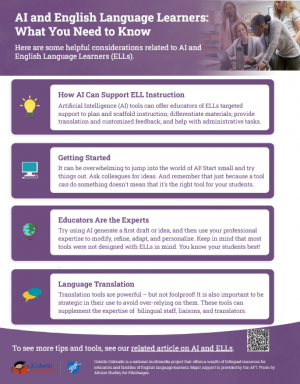
AI is a kind of technology that uses machines to rapidly do tasks typically accomplished by humans, such as:
- Predicting
- Analyzing
- Summarizing
- Simplifying
- Compiling
- Inferencing
- Problem solving
AI can also be used to create new content, such as text, images, videos, and formatted materials. These are often created in response to a prompt entered by the user or through a tool created for a specific purpose.
This type of AI, called Generative AI, is informed and shaped by existing data, information, and content already online, as well as new content currently being created by AI. This is different from traditional search engines that scan and match online content and websites based on key terms.
Text Engineering: Example
To understand the difference between a traditional online search and using AI, see the following example — which also underscores why it's important to review everything AI creates! This example focuses on our popular text engineering strategy, which embeds scaffolds and supports directly into grade-level text in order to increase student comprehension.
- Google Search: When you enter "Text Engineering Colorín Colorado" as a Google search query, a traditional search brings up a link to our text engineering strategy.
- Google AI: When you switch to Google's AI mode, one response we got was the following, which goes a few steps beyond a search — and shows the literal interpretation of the prompt:
"The search query 'text engineering colorin colorado' likely refers to a teaching strategy developed by the educational website Colorín Colorado to help students, particularly English Language Learners (ELLs), comprehend complex grade-level texts. It is not a standard engineering field or a specific job in Colorado."
How are educators using AI?
Educators are using AI in many different ways, such as:
- Lesson planning
- Assessment
- Student engagement
- Feedback
- Personalized learning
- Automation of routine tasks
- Accessibility
- Language access
Why is it important for educators to learn about AI?
Even though it may be tempting to keep AI at a distance, Christina Patterson argues that students need their educators engaged with this topic in order to:
- Teach digital literacy
- Have a voice in decisions related to AI
- Make informed decisions about using AI
- Manage and oversee students' use of AI
- Advocate for more teacher training and family outreach around AI
- Advocate for strong privacy protections
- Learn from our students and families
- Center students and the nurturing they need
- Highlight educators' important roles
- Prepare students for the classrooms and workplaces of the future
Fundamentally, she says, it's critical for educators to get comfortable with talking about the use of AI while also articulating our own essential roles in schools. AI is not a replacement for educators or support staff, and this message can not be overemphasized. It is especially important to talk through appropriate uses of AI as new uses are explored or adopted across districts, particularly in terms of ELLs.
In addition, keep in mind the following:
- Today's students are coming of age in a world in which AI is already in use. Consider this question from a fourth grader: "How do I know if this photo is real or was made by AI?" We all need to learn a new kind of digital literacy to engage responsibly with the types of technology and media that are rapidly changing.
- At the same time, the need for strong social and emotional support in schools has only intensified since the COVID-19 pandemic. This work is done by building personal relationships and putting student supports in place. It's important for educators to be able to advocate for approaches that put students at the center, just as it's important for students to be surrounded by caring communities where they can learn why these personal relationships matter.
- Finally, it can be helpful to look back at the overnight switch to virtual learning that happened during the pandemic. Teachers, students, and families all had to work together to learn and manage several new kinds of technology. And even though many students brought their own advanced tech skills to the table, it was the teachers who had to decide which tools to use and which were the best fit for their students — just as teachers will increasingly need the skills necessary to manage the use of AI in their classrooms and to partner with students and families around AI.
Note: As mentioned above, we will create more resources on student use of AI in the near future. In the meantime, it's important to keep in mind that AI companion chatbots pose particular risks for vulnerable children and youth. Young people who lack critical thinking skills are especially susceptible to believing inaccurate information presented by a confident-sounding bot. Even so, some companies are developing AI "counselors." This is a poignant example of why educator input and engagement around AI decisions is essential.
Getting Started with AI
As you dip your toe in the AI pond, keep the following tips in mind.
Start small and try things out.
It can be overwhelming to jump into the world of AI. Take it one step at a time and be ready to learn from trial and error. Starting with tools already approved by your district can be a good place to begin. You can also ask colleagues to show you how they are using AI. And you might try some tools for a personal task, like creating an itinerary for a weekend getaway or generating household tips.
Always review AI content.
Always review what AI creates. Think of any AI-generated material as a first draft that will likely need changes and a check for accuracy. (You don't have to look far for examples of AI-generated errors, as seen in this BBC news story, Glue pizza and eat rocks: Google AI search errors go viral.)
Keep an eye out for bias.
AI tools reflect several kinds of bias, including demographic, gender, and linguistic bias. Keep this in mind as you use AI tools and review AI-generated content. You may wish to modify your prompts to adjust your results.
Review your district's AI policies.
Review your district's AI policies so that you know which tools are approved and what privacy protections are in place. If a policy doesn't yet exist, share your questions and other district policies with administrators and look for ways to join conversations about AI in your district.
Protect student privacy.
Remember to never upload any personal student information into AI tools, including names, contact information, photos, or ID numbers. Ensure that families understand what protections are in place.
Trust your instincts.
Approach AI with a healthy dose of skepticism and remember that just because a tool can do something doesn't mean that it's the right tool for you or your students. If you have concerns that are not being addressed at the school or district level, find other colleagues who are ready to engage with this topic. You can also learn more from resources such as AFT's Commonsense Guardrails for Using Advanced Technology in Schools and AFT's Share My Lesson AI and Education webinar series.
ELL Considerations
Remember: You are the expert!
Keep in mind that most AI tools have not been designed with ELLs in mind. That means that your ELL expertise is critical in determining which AI tools and materials are a good fit for your students. It also means that you may use AI tools differently than your colleagues. Try using AI to generate a first draft or idea, and then use your professional expertise to modify, refine, adapt, and personalize. You know your students best!
To think about what this means in practice, take a look at this annotated icebreaker activity list generated by AI. It includes notes that are meant to encourage educators to trust their own instincts when reviewing AI materials. Think of it as an AI mentor text!
Use translation strategically.
Translation tools are a powerful addition to educators' toolkit. They can be used to scaffold instruction and support family engagement. However, they are not foolproof. It is also important to be strategic in their use to avoid over-relying on them — and nothing can replace the valuable expertise of bilingual staff, liaisons, and translators who have strong relationships with students and families. Ideally, a fluent bilingual speaker would review messages and documents that are sent home to families first to ensure accuracy.
Practice your prompts.
AI prompts are an important piece of the puzzle. The more specific your prompt is, the closer the result is likely to be to what you want. You can continue refining your prompt and iterating as well, incorporating information about language proficiency level, target skills, and students' own languages. Keep in mind that many tools will add follow-up questions, ideas, and prompts for the user to further expand the content created.
Look for ways to integrate standards, rubrics, and key strategies.
Even though most AI tools don't have ELL considerations "baked in," many tools allow you to integrate other documents through uploads and links. You can upload language proficiency standards, rubrics, and other types of documents to help generate ideas related to ELL instruction and best practices. You can also refer to online links and articles. (See examples below in the sample prompts.)
Look for ways to collaborate.
As you try out new ideas, share what you're doing with co-teachers and other ELL colleagues. Find out how they are using AI and identify some key uses to support your students.
AI Ideas for ELL Instruction
Now let's take a deeper dive. Here are some different ways you can use AI to support your ELL instruction. See additional ideas in Susan Lafond's article about using AI in ELL instruction.
This is an introductory list to jumpstart one's thinking on how to utilize AI. As more educators use generative AI in creative ways, and as more AI tools are developed in response to the needs of educators and students (including ELLs), this list will keep expanding!
Lesson Planning
You can use AI tools to develop:
- Standards-aligned lessons
- Content and language objectives
- Activities
- Formative assessment
Scaffolding
You can use AI tools to generate scaffolds such as:
- Visuals
- Prompts
- Graphic organizers
- Translations
- Glossaries with visuals, translations, definitions, and sample sentences
Speaking and Listening
You can use AI speech/text tools that:
- Provide feedback
- Create captions and transcripts
- Read text aloud
- Translate speech and text in real time
Reading
You can use AI tools that:
- Level text
- Simplify text
- Summarize text
- Generate skill-based practice activities
- Generate comprehension questions and activities
Writing
You can use AI tools that can develop:
- Writing prompts
- Sentence frames
- Outlines
- Mentor texts
- Writing feedback
Administrative Tasks
You can use AI tools for help with:
- Emails
- Newsletters
- Student goals
- Meeting notes
- Progress reports
Supporting Family Engagement
You can use AI tools to:
- Provide translation
- Support communication
- Support engagement
AI Tools
Here are some examples of AI tools. These are just a handful, but they are some of the most commonly used by educators.
You may wish to try a tool that is already in use in your district, or try something else on your own. Many AI tools require an account for free access, and then paid features can be added on. You can also get an idea of what a tool does from videos on the company's website, social media feed, or YouTube channel. We have also included a few non-profit options below.
As you try different tools, you will find that some are more effective for certain tasks than others. You may also wish to enter the same prompt in multiple tools and compare results. Susan Lafond has also provided some helpful notes about features of different tools in her AI and ELLs article.
| Large Language Models | |
|---|---|
| You can use these tools to create instructional materials by entering specific prompts, reference documents (such as language proficiency standards), and resources. | |
| Lesson Planning Tools | |
These tools offer options for lesson planning, instruction, assessment, personalization, and material creation. Some also provide materials in multiple languages. | |
| Language, Literacy, and Feedback | |
| These tools focus on tasks related to language and literacy development; some also offer feedback on writing and speaking. Some of these tools are plug-ins or app features. |
|
Sample Prompts
Here are some sample prompts you can use for practice. Keep in mind that you can edit, refine, and expand upon the prompts you use. You can also usually edit the materials that are created, which are often available for download or to save.
- WIDA-aligned speaking prompts: Create a printable handout of pre-written AI prompts that focus on speaking aligned to WIDA Proficiency levels.
- Sentence starters: Create 3-5 sentence starters a teacher would ask on the topic of the water cycle. Target this activity for fourth-grade English language learners with Beginner and Intermediate English language proficiency skills.
- Key vocabulary: Identify key vocabulary in this Smithsonian passage about superheroes. Create a glossary of key terms that includes words, definitions, sample sentences, and the translation of the word in Spanish. https://www.si.edu/spotlight/superheroes
- Text engineering: Use the strategies from Colorín Colorado's text engineering strategy to share some examples of how to engineer the second paragraph of this Smithsonian text about Stan Lee.
Note: Adjusting AI prompts, even slightly, may yield different results and responses. It's helpful to try different approaches when you are using AI and to be ready for some trial and error.
Here are some examples of more detailed prompts:
- Feedback on a writing assignment: Provide detailed feedback on a student's writing in the language they are learning. This feedback should include corrections of any grammatical errors, suggestions for more natural phrasing, and advice on how to enhance their writing style. Your goal is to help the student improve their proficiency in the English by offering constructive criticism and personalized learning tips. Ensure your feedback is clear, encouraging, and tailored to the student's current level of understanding. Additionally, highlight the strengths in their writing to motivate them further. This is a beginner. Be positive, but identify 2 ways to improve.
- Family email: Write a warm and friendly welcome email to the parents/family of my high school ELL students that will be sent at the beginning of the school year in the fall. Start with a comment about the seasonal weather and the excitement of coming back to school, then an introduction of myself. Add suggestions on how they can help their students do their best at school. Ask parents to reach out to me via email or use Whatsapp if they have any questions. // Follow-up prompt: Please translate this letter into Spanish, Vietnamese, and Arabic.
Sample AI Resources
We generated these resources using ClaudeAI. We then added annotations to point out different features and considerations for ELL educators.
- Back-to-School Icebreakers for Multilingual Elementary Students
- Scaffolding Text with AI: Sample Prompts
Learn more
Learn more from the following resources. For some brief videos and tutorials, we recommend Common Sense Media's AI Literacy Lessons.
- AI Resource Collection (Colorín Colorado)
- Commonsense Guardrails for Using Advanced Technology in Schools (AFT)
- AI Literacy Lessons for Grades 6-12 (Common Sense Media)
- AI for Educators: Free Professional Development Courses (Common Sense Media)
- Generative AI: Articles for Educators (Edutopia)





Add new comment