

When it comes to virtual learning, we've come a long way from the early days of the COVID-19 pandemic. More schools have used virtual learning (also called distance learning, remote learning, and online learning) during events that lead to school closures, such as severe weather, and many schools across the country are currently exploring virtual options due to increased immigration enforcement in their communities.
Whatever the reason for virtual learning, however, it is critical that schools ensure all students, including English language learners (ELLs) and immigrant families, have access to the devices and online connections they need. In addition, it's important to keep in mind that today's early elementary students, as well as students who arrived in the U.S. after the pandemic, did not experience virtual learning in U.S. schools during the pandemic (as opposed to older elementary and secondary students). They (and their families) may be figuring out to use the necessary technology for the first time.
Here are some helpful tips and lessons learned to ensure students have the technology they need to stay connected.
The Digital Divide
The COVID-19 pandemic shone a bright light on the digital divide (an issue of concern for ELL educators for many years) as technology access became a necessity overnight. In many places around the country, families' access to devices, computers, and Internet service did increase during that time, although the roll-out was bumpy and complicated.
Yet the divide still remains, as do certain challenges, including:
- Sustaining access to personal devices for students
- Logistical hurdles for families' online access at home
- Changes in funding streams and policy related to educational technology, such as the end of ESSER funds and certain federal grants and the elimination of the U.S. Department of Education's Office of Education Technology in March of 2025
In addition, a recent report by the State Educational Technology Directors Association focused on the importance of professional development around technology, noting, "A 'digital use divide' is persisting, at least partially due to a lack of sustained teacher professional development in helping students engage in deeper learning experiences through technology — especially as artificial intelligence becomes more prevalent."
Against this backdrop, where should schools focus their efforts? Here are some areas to highlight.
Access to Devices
What You Need to Know
ELL educators have shared the following insights about their students' access to technology over the last several years:
- In many ELL families, multiple siblings shared devices for their schoolwork.
- Students without devices may used cell phones to complete assignments.
- Some families don't know that devices are available from their district and don't find out about these options in time to get a device.
- Families may be reluctant to take a device home due to concern about damaging the device.
- Immigrant families may be concerned that using a device provided by the school would impact their immigration cases if using the device was considered a social "benefit."
- Immigrant families may also have privacy concerns related to using a device provided by the school.
Ideas for schools
- Schools and districts may wish to start with a needs assessment and talk with families about students' access to a device for schoolwork.
- It is important for educators to be on the lookout for students who:
- Do not have a device
- Plan on sharing a device with a sibling
- Plan on using a cell phone to complete schoolwork
- If you do identify students who don't have a device for schoolwork, talk with an administrator about whether there are options to fill this gap. In addition to any district programs or grants to expand technology access, local community partners, businesses, or individuals may be able to contribute to a technology fund.
- Districts may also wish to consider programs that offer a device as part of a digital literacy course so that families learn important technical skills, such as this program in Boulder, CO.
- In addition, schools should not assume that educators have devices or internet access at home.
Internet Access
What You Need to Know
Even if all students have a device, access to reliable Internet connections may prove to be another obstacle in virtual learning.
Here are some of the situations that educators of ELLs shared with us during the pandemic:
- Information about internet access was not available in families' home languages, or it was too confusing.
- Families lived in residences whose address was not recognized by the internet company.
- If multiple families were sharing a residence, there were cases in which the internet company only allowed one registration per address, leaving other families in the residence without an option of setting up their own connection.
- If internet companies required a social security number and no "past due" bills to register for free access, this deterred some families from signing up.
- Students in more rural areas were not be able to get a signal even with reliable internet providers and routers.
- Some families did not have electricity at home, as in the case of migrant farmworkers living in temporary housing or trailers.
- Some families were afraid to sign up due to their immigration status.
Ideas for schools
In order to overcome these challenges, schools and districts have tried some creative solutions, such as:
- Providing devices with data, where students could connect anywhere and anytime
- Offering hot spots, including on buses that would travel to neighborhoods where internet access was an issue
- Offering free wi-fi at the school (or partnering with another institution in the community to provide wi-fi) that families could access from the parking lot to download relevant information
- Partnering with municipal governments, internet providers, and cell phone companies to expand access
There is no "one-size-fits-all" solution to this challenge, which is why understanding your families' circumstances will lead to a better solution for your students and educators.
Family Communication and Partnerships
Communicating with ELL Families: 10 Strategies for Schools
In addition, educators who have worked on this issue continue to underscore the importance of strong relationships with families. This is particularly important when dealing with unexpected school closures and uncertainty related to immigration enforcement.
What You Need to Know
- Families may not have access to updates from the school, especially if those updates aren't available in their home languages. This may be especially true for newcomers. Make sure families have access to communication channels and have contacts for liaisons who handle family outreach.
- During periods of local immigration enforcement, families may not wish to send their children to school or to come to the school themselves. They may also be harder to reach if their situation or contact information has changed or they are afraid of answering any calls or inquiries from the school. This may impact whether or not schools can contact families to help them access devices and online connections.
- Educators who partner with families frequently, including ELL and bilingual educators, interpreters, and family liaisons, will have valuable tips and recommendations. These educators may also be part of professional networks where they can learn what is working in other districts.
Ideas for schools
- Families have a legal right to information from the school in their home language.
- Learning more about how and when families prefer to communicate can make a significant difference in family engagement. For example, some districts have had success with texting apps such as Whatsapp and Talking Points, as well multilingual groups on Facebook. Many families also have strong networks amongst themselves that include texting groups, social media groups, and phone trees.
- Keeping in communication with students and families about what's working (or not) will help schools figure out where to focus their efforts.
- Sharing family surveys via phone or text — and in families' languages — will likely yield more information than posting surveys online, especially if the surveys are not translated.
Finally, it is important not to make assumptions. Many immigrant families may use technology to help with their international communication, and some ELLs are so advanced that they provide technical support for other students and their teachers! Students may also be quite familiar with one kind of digital tool, like apps, but not others.
Tech Support and Training
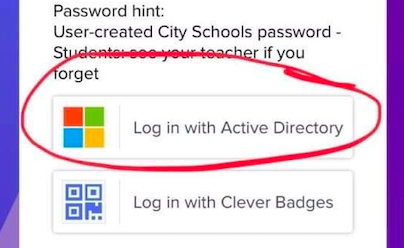
Once students have devices and data, there is still another key step needed to ensure students can successfully use their distance learning platforms — training and tech support. Many English-speaking families described being overwhelmed by the number of platforms and log-ins needed for their child or children to complete schoolwork.
You can imagine what that challenge was like for ELL students and families who were often navigating new platforms and trying to get their technical questions answered.
Tips for schools
Multilingual tutorials
To increase student success, schools and districts might consider offering translated student and family tutorials about the platforms they will be using. Some platforms have translated tutorials available, or districts have created their own.
For example, Hartford Public Schools shares this Google Classroom tutorial in Spanish on their website and the New York City Department of Education has a collection of multilingual Google Classroom tutorials available on YouTube.
Providing technical support
In order to identify key needs and priorities around tech support, you may wish to ask families about the challenges they have had with technology during the pandemic.
In addition, the following steps can improve technical support for multilingual families:
- providing a translated form where families can keep track of their child's log-in info and any family log-in info they need
- providing "how-to" instructions through short videos or screen shots with highlights or arrows (which can be added through "markup" features on smart phones)
- ensuring that families have a way to ask questions related to tech support with the assistance of an interpreter
- setting up a process for collaboration and communication among educators, interpreters/family liaisons, and tech support staff
- providing training for families on how to use their device or platforms to support learning.
Protecting Student Privacy
It is critical to keep in mind that privacy concerns may be particularly complex for families of English learners and immigrant students. At the same time, families who are using internet and wi-fi at home for the first time may need additional information about how to protect their privacy.
Your district may have policies in place regarding student privacy and online learning. For example, some districts restrict the use of videos of students. Check with your school administrator for clarification as needed and also to share appropriate information with families on protecting their privacy in their home language.
Offline Instruction at Home
Finally, there are numerous resources for helping to support instruction at home when technology access is not available (or to complement online learning). You will find many of these resources and activity ideas, as well as tips on how to build upon families' cultures, languages, and strengths, in Offline Learning at Home: Ideas for ELLs.
Partnering for Success
There are numerous steps schools and districts can take to expand ELLs' technology access, and we hope this article provides some ideas that might work in your setting. We encourage educators and administrators to keep networking, sharing what works, and developing solutions so that students have access to the technology they need to continue their learning during the pandemic and beyond.
Related news and updates
- How Some Schools Are Thinking About Virtual Learning When ICE Comes to Town (Education Week)
- How K-12 leaders can tackle the ‘digital use divide’ (K-12 Dive)
- Digital Equity Isn’t Just About Devices and Internet Access (Education Week)
Acknowledgements
Special thanks to educators who have provided feedback through surveys and social media, as well as to the staff of Wolfe Street Academy, a community school in Baltimore, MD, for great insights!




Add new comment