
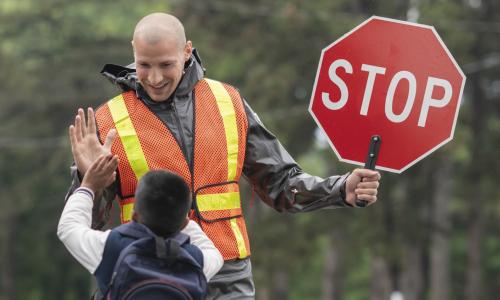
Crossing guards have an essential role to play in helping students get to and from school safely. There are also many ways that school crossing guards can support English language learners (ELLs) and that transportation managers and administrators can improve communication and outreach among ELL families. Here are some ideas to get started!
This article includes the following resources:
- A tip sheet for sharing
- A slide deck that features a professional learning session
Acknowledgements
Special thanks to the Douglas County School District (CO) for their contributions to this article!
The First Day
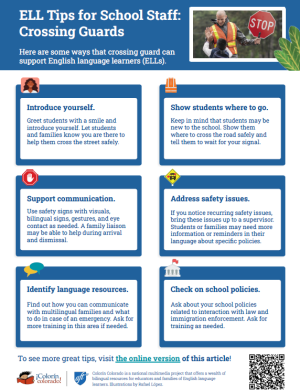
Introduce yourself.
- Greet students with a smile and introduce yourself.
- Wear a nametag.
- Remember that each adult in a school community can make an important difference to an ELL.
Keep in mind that ELLs may be new to your school.
- ELLs may have never been to your school before. They (and their families) may be nervous!
- Patience can go a long way in helping students feel comfortable.
Show ELLs where to go.
- Ensure students know where to cross the street safely.
- Pair students with a buddy if needed.
- Ask safety patrols or parents to lend a hand.
- Tell students to wait for your signal to cross the road.
- Use gestures and eye contact as needed.
Review safety rules.
- Use signs with visuals.
- If possible, use bilingual signs or add translated terms to safety signs.
- Review safety rules with students early and often.
Address safety issues promptly.
If a safety issue arises or you notice a recurring issue:
- Talk with a supervisor or administrator first
- Find out if better communication is needed
- Share your ideas for how to address the issue
Communicating with Families
Help families understand what walking routes they should use.
- Point out where families should walk, drive, and drop off students during arrival and dismissal.
- Family liaisons may be able available to help answer questions.
- If you notice that there is a problem or confusion, bring the issue to a supervisor immediately. Students or families may need more information or reminders in their language about specific policies.
Keep in mind that families may not be familiar with school routes and routines.
Students and families may not be familiar with routines around:
- Arrival and dismissal
- Early release
- Inclement weather
Support family communication.
Find out how your district handles ELL family communication, such as:
- Interpreters or family liaisons
- A language line
- A language app
Ask for more training using these resources if needed.
Go over emergency procedures.
- Find out what to do in case of an emergency, including whom to contact that speaks families' languages.
- Keep in mind that students who speak English may revert to their language in an emergency.
Preventing Bullying
Watch out for bullying.
- Address any bullying outside of the school immediately.
- ELLs and their families may not be familiar with school policies on bullying and they may be afraid to report any incidents.
Be aware of why ELLs may be bullied.
Students should not be bullied for any reason, including:
- Language
- Accent
- Country of origin
- Immigration status
- Cultural customs
- Food
- Dress
Immigrant Students
Know immigrant students' rights.
- All students have a right to a free public K-12 education, regardless of their (or their parents') immigration status.
- School staff should never ask or refer to students' or families' immigration status.
Ask for training on important policies.
It’s important to know what steps to take if law or immigration enforcement approaches your school.
Ask supervisors for legal guidance and training on your district's policies about:
- Student privacy
- Interactions with law enforcement
- Interactions with immigration enforcement
Sharing Successes
- Share success stories about working with ELLs and ELL families with your colleagues and supervisors, no matter how small.
- This can help create a positive culture that supports students.
- Share ideas about helping ensure that ELLs are represented in safety patrol programs.
Celebrate achievements!
Celebrate the ways that crossing guards help students every day — and the ways they help their community!
Ideas for Transportation Offices
Here are some recommendations for transportation managers and administrators. Several of these ideas come from Douglas County School District in Colorado.
- Coordinate with family liaisons to help explain school schedules and routines to students and families, ideally before school starts. This training should include information about arrival and dismissal, early release, and inclement weather, as well as guidelines about which walking routes students will be using.
- Invite crossing guards to open house, back-to-school night, or other events where they can meet families.
- Enlist bilingual parent volunteers to help near crosswalks on a regular basis. (These volunteers can help with questions that arise.) Provide these volunteers with basic training about how school walking/driving routes work and how to report any behavior issues.
- Show crossing guards how to use family communication apps to share updates or communicate important information.
- Create a procedure for addressing behavior issues. For example, this might include a meeting with an assistant principal, families, students, crossing guard, interpreter and/or family liaison.
Ideas for Educators
Classroom Teachers
- Invite crossing guards to your classroom to meet students. Ask them to explain what they do and how they help students stay safe.
- Show your appreciation for crossing guards through thank-you notes or kind gestures during the year.
- Keep in mind that crossing guards can play an important role as a friendly face in the school.
Professional Learning
This Colorín Colorado slide deck can be used for turnkey professional development sessions. Please share attribution to Colorín Colorado.
To get started, you need the slide deck below, which includes activities, discussion questions, and speaker's notes.
We recommend customizing these sessions with screenshots of related platforms, policies, or resources from your setting.
To edit this presentation, you can download or copy the slides:
- File > Download (no Google account required)
- File > Make a copy (Google account required)





Add new comment